Control Center iOS 15 - Move t1.0.7
Publisher Description
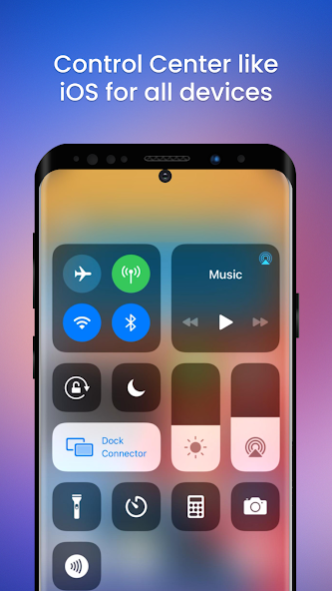


Control Center iOS 15 - Move to iOS allows access to some quick actions, saving you time searching and opening the app.
Control Center iOS 15 - Move to iOS will help your phone perform better, more beautifully and more luxurious.
★★★★★ Key features of Control Center iOS 15 - Move to iOS:
- Quickly setting action.
- Airplane Mode: Use Airplane Mode to instantly turn off Bluetooth, Wi-Fi, and cellular connections on your android device.
- Wi-Fi: Turn on Wi-Fi to browse the web, stream music, download movies, and more.
- Bluetooth: Connect to headphones, car kits, wireless keyboards, and other Bluetooth-enabled devices.
- Do Not Disturb: Silence calls, alerts, and notifications that you receive while your device is locked.
- Portrait Orientation Lock: Keep your screen from rotating when you move your device.
- Adjust brightness: Adjust the brightness of your display from any screen.
- Flashlight: The LED flash on your camera doubles as a flashlight, so you can get extra light when you need it.
- Alarms and Timer: Set an alarm, timer, or stopwatch, or check the time in another country or region.
- Calculator: Tap numbers and functions in Calculator, just like a standard calculator.
- Camera: Never miss a moment to take a picture with quick access to your camera.
- Control audio: From here, you can quickly play, pause, and control the volume of your favorite song, podcast, and more.
- Record Screen: Record any action on your phone.
- Screenshot: Capture screen
★★★★★★ Customize feature supported:
- You can change color of bar with your favorite color, totally free
- Select the background displayed in the control center.
- Change the size of the bar (width, height). Change opacity of bar
- Select the default music player app to stop and change the song.
- You can change the profile when recording video.
- You can select the favorite application to display in the control center.
- Enable vibrate when touched.
- Enable notification when screenshot.
- Add or remove apps or controls on the Control Center
- Integrate more iOS Calculator and iOS Watch
★ Right now, install Control Center iOS 15 - Move to iOS and experience the new things the application gives you and Don't hesitate to contact us if you have any questions.
Email: azizion0796@gmail.com
Thanks for using our apps!
About Control Center iOS 15 - Move t
The company that develops Control Center iOS 15 - Move t is Fansipan, Inc.. The latest version released by its developer is 1.0.7.
To install Control Center iOS 15 - Move t on your Android device, just click the green Continue To App button above to start the installation process. The app is listed on our website since 2021-09-19 and was downloaded 2 times. We have already checked if the download link is safe, however for your own protection we recommend that you scan the downloaded app with your antivirus. Your antivirus may detect the Control Center iOS 15 - Move t as malware as malware if the download link to com.fansipaninc.centrolcenterios is broken.
How to install Control Center iOS 15 - Move t on your Android device:
- Click on the Continue To App button on our website. This will redirect you to Google Play.
- Once the Control Center iOS 15 - Move t is shown in the Google Play listing of your Android device, you can start its download and installation. Tap on the Install button located below the search bar and to the right of the app icon.
- A pop-up window with the permissions required by Control Center iOS 15 - Move t will be shown. Click on Accept to continue the process.
- Control Center iOS 15 - Move t will be downloaded onto your device, displaying a progress. Once the download completes, the installation will start and you'll get a notification after the installation is finished.
Program Details
System requirements
Download information
Pricing
Version History
version 1.0.7
posted on 2021-09-20
App optimize
